
Mini Case Study and Visual Showcase
Mini Case Study and Visual Showcase
Neol is a AI-Powered Recruitment SaaS Platform for B2B
Neol is a AI-Powered Recruitment SaaS Platform for B2B
Neol is a AI-Powered Recruitment SaaS Platform for B2B
Neol streamlines the hiring process for tech companies across company’s own network or Neol s global expert pool by using AI powered search, analysis and reviews.
Neol streamlines the hiring process for tech companies across company’s own network or Neol s global expert pool by using AI powered search, analysis and reviews.
Problem Statement
Problem Statement
Enhancing Neol’s Conversational AI for Deep Talent Discovery
Enhancing Neol’s Conversational AI for Deep Talent Discovery
The Challenge
The Challenge
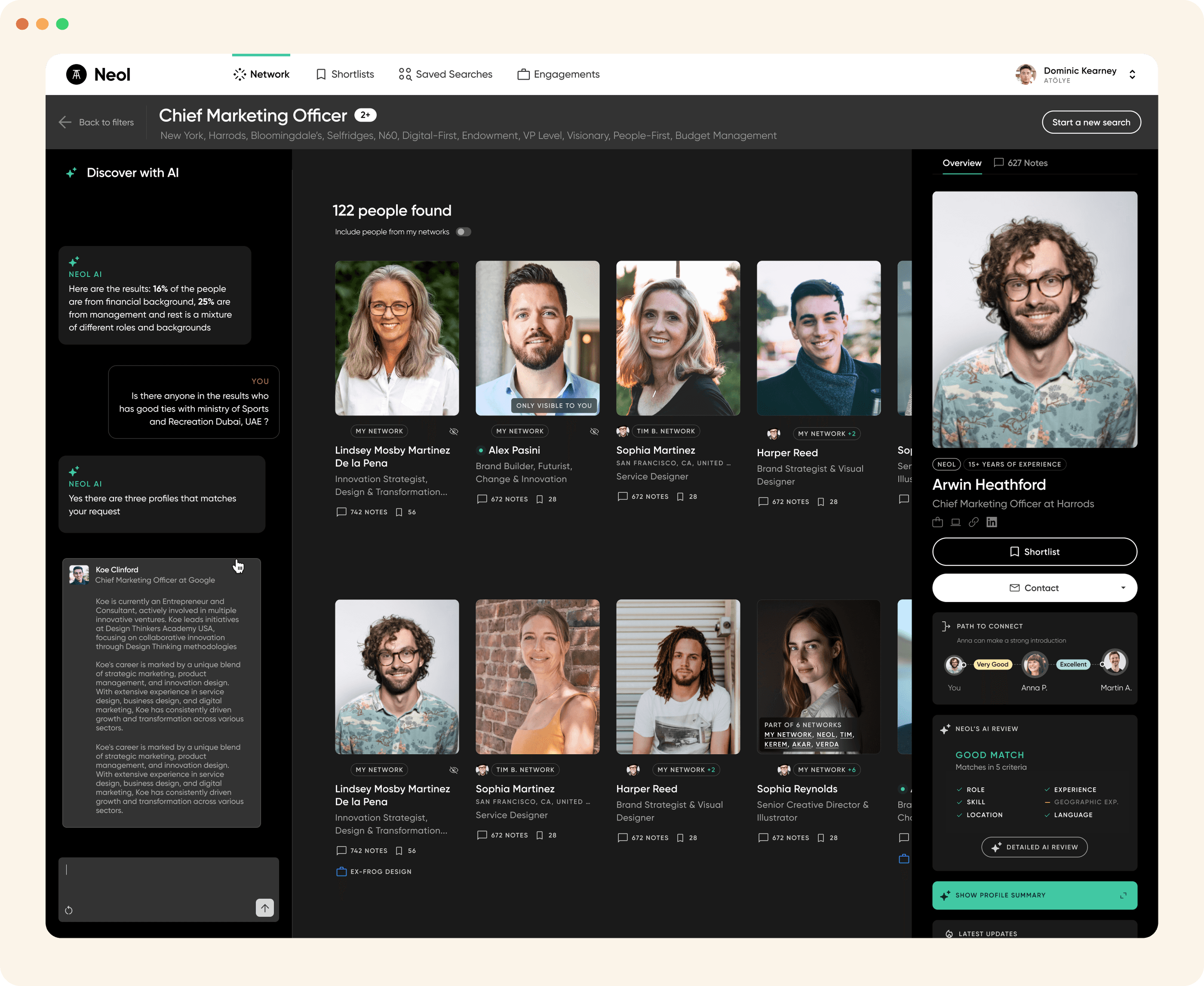
Even though the initial start point should be via conversational AI, the prominence of the keyword search bar at the top of the dashboard led to "habitual searching" and people generally tend to basic keywords search, resulting in generic candidate matches and a failure to realize the platform's AI capabilities.
Even though the initial start point should be via conversational AI, the prominence of the keyword search bar at the top of the dashboard led to "habitual searching" and people generally tend to basic keywords search, resulting in generic candidate matches and a failure to realize the platform's AI capabilities.
The Goal
The Goal
Directing our users from keyword search into Conversational AI so that Neol AI can perform deep-dives, comparisons, and extract hidden facts about candidates that may not be explicitly visible on their profile or CV.
Directing our users from keyword search into Conversational AI so that Neol AI can perform deep-dives, comparisons, and extract hidden facts about candidates that may not be explicitly visible on their profile or CV.
Conversational AI chat box
Conversational AI chat box

Design Decisions
Design Decisions
Guided Discovery:
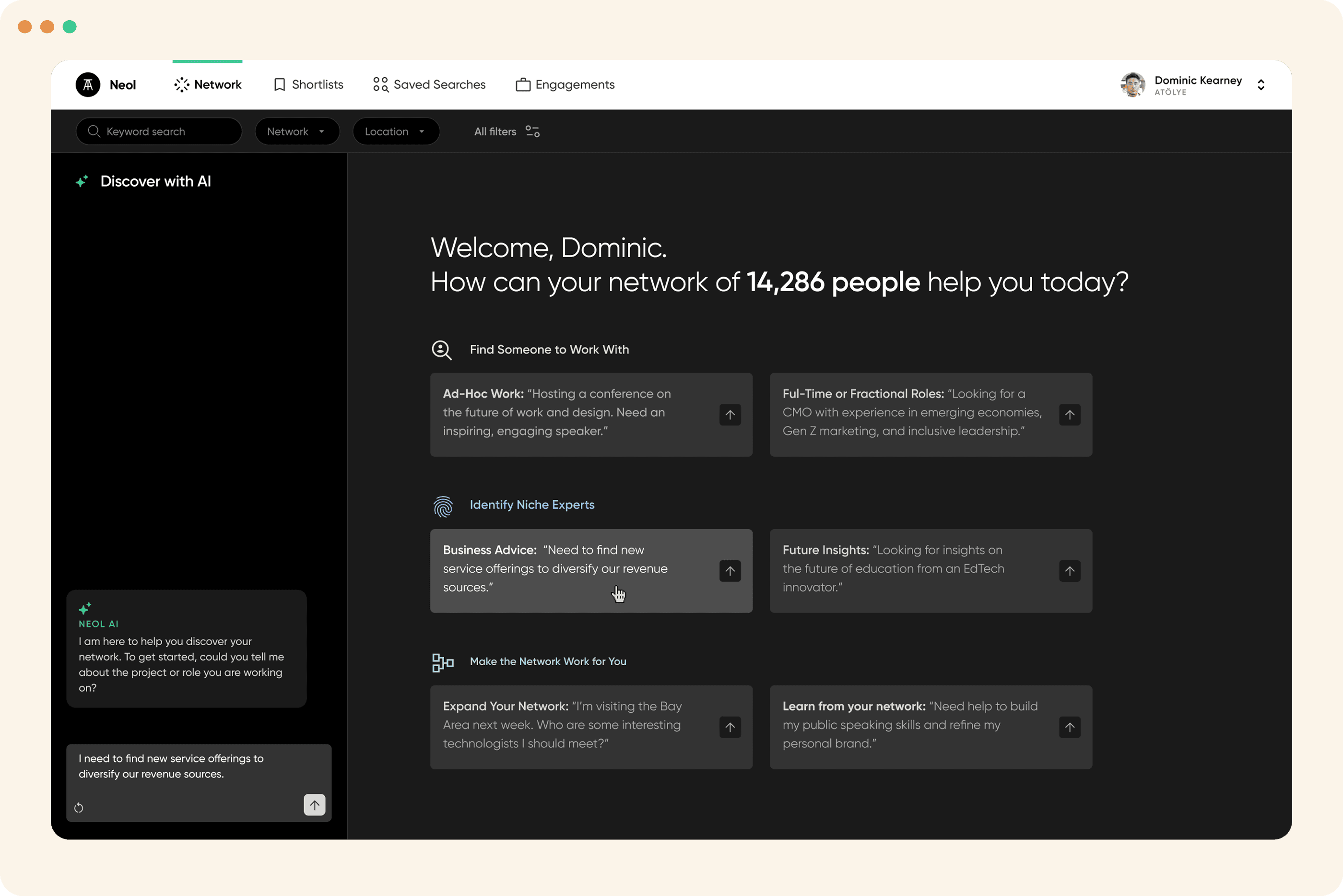
I introduced a suite of six starter prompts based on our data and categorized by search intent. This starter prompts lowered the "blank page" anxiety and showcased the platform’s specific value propositions to the new users.
Visual Prominence:
I redesigned the chat interface with a larger footprint and higher contrast ratio and start animation to draw the users attention and establish a clear visual hierarchy.
Rationale behind why I placed the Conversational AI on the left:
Based on our A/B tests, left aligned interface performed better than right hand-side version and as humans we usually scan in an F-pattern. Putting it on the left made it the literal first thing they see and established a good starting point.
Guided Discovery: I introduced a suite of six starter prompts categorized by search intent. This lowered the "blank page" anxiety and showcased the platform’s specific value propositions immediately.
Visual Prominence: I redesigned the chat interface with a larger footprint and higher contrast ratios to establish a clear visual hierarchy.
Focus Drifting: To further signal the intended starting point, I added a subtle entry animation and glow effect to the chat area, drawing the user’s eye toward the conversational interface upon landing.
Conversational Onboarding: By placing the conversational AI on the left (following natural F-pattern reading logic), I enabled users to describe their "ideal candidate" in natural language, triggering a guided flow rather than a static results list.
Rationale behind why I placed the Conversational AI interface on the left:
Based on our A/B tests, It performed better than right hand-side version and as humans we usually scan in an F-pattern. Putting it on the left made it the literal first thing they see and read.
Guided Discovery:
I introduced a suite of six starter prompts based on our data and categorized by search intent. This starter prompts lowered the "blank page" anxiety and showcased the platform’s specific value propositions to the new users.
Visual Prominence:
I redesigned the chat interface with a larger footprint and higher contrast ratio and start animation to draw the users attention and establish a clear visual hierarchy.
Rationale behind why I placed the Conversational AI
on the left:
Based on our A/B tests, left aligned interface performed better than right hand-side version and as humans we usually scan in an F-pattern. Putting it on the left made it the literal first thing they see and established a good starting point.
The Impact
The Impact
%67.3
Increase in usage of conversational AI
Increased the usage of conversational AI resulting in better and more specific results rather than user's going to standard keyword search with less specific results and higher time to find the ideal candidates.
Increased the usage of conversational AI resulting in better and more specific results rather than user's going to standard keyword search with less specific results and higher time to find the ideal candidates.
%24.2
Increase in search success rate
Increased the 'Search Success Rate' (users finding a candidate they liked in the first 12 results) by 24.2% due to more specific AI-driven queries.
Increased the 'Search Success Rate' (users finding a candidate they liked in the first 12 results) by 24.2% due to more specific AI-driven queries.
%15.8
Reduced time to first action
Reduced “Time to First Action' by 15.8%; the entrance animation and glow effect successfully minimised cognitive load by signalling the primary starting point.
Reduced “Time to First Action' by 15.8%; the entrance animation and glow effect successfully minimised cognitive load by signalling the primary starting point.
3x
Candidate
save rate
Candidate Save Rate: Users who utilized the AI conversational flow saved 3x more candidates per session compared to those using traditional keyword search.
Candidate Save Rate: Users who utilized the AI conversational flow saved 3x more candidates per session compared to those using traditional keyword search.
A Failed Design Experiment
A Failed Design Experiment
Alternative Dashboard Design
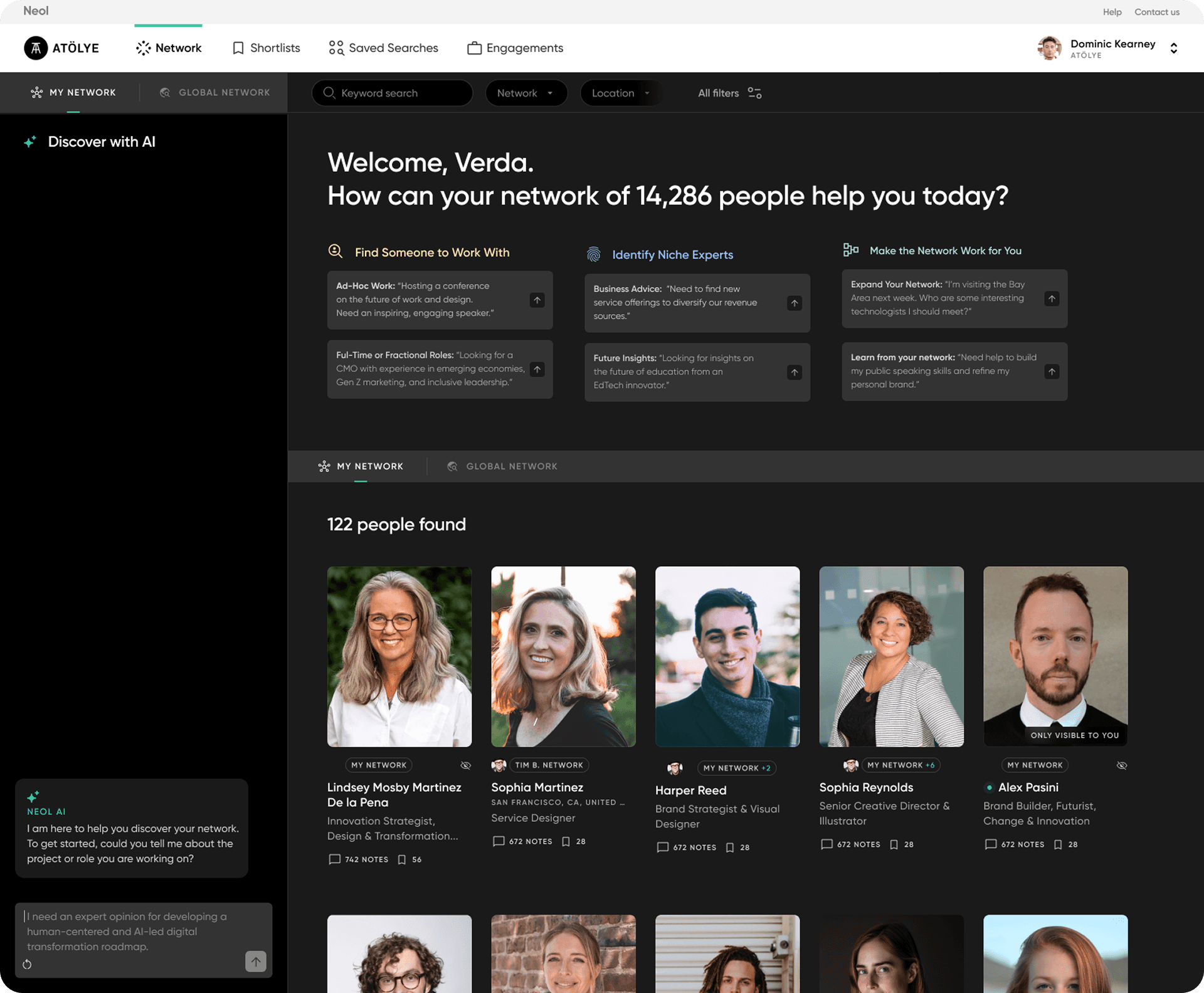
In this alternative version, I explored a "Hybrid Dashboard" that displayed the user’s existing network alongside the AI interface. The hypothesis was that seeing their network would provide immediate context.
The Pivot: I decided to deprioritize the network view in favor of a "clean-slate" conversational UI. This reduced cognitive load and ensured that the user’s first interaction was high-intent prompting rather than passive browsing.
The Result: Testing revealed a 19% drop in AI conversations. The additional visual data and network overview created noise distracting users from the primary value proposition confirming that a minimalist, focused UI was essential for driving adoption of AI search feature.
Alternative Dashboard Design
In this alternative version, I explored a "Hybrid Dashboard" that displayed the user’s existing network alongside the AI interface. The hypothesis was that seeing their network would provide immediate context.
The Pivot: I decided to deprioritize the network view in favor of a "clean-slate" conversational UI. This reduced cognitive load and ensured that the user’s first interaction was high-intent prompting rather than passive browsing.
The Result: Testing revealed a 19% drop in AI conversations. The additional visual data and network overview created noise distracting users from the primary value proposition confirming that a minimalist, focused UI was essential for driving adoption of AI search feature.
Alternative dashboard design
Users can start conversation on the left, can initiate a conversation with pre-made prompts at the top and see their network at the bottom
Reflections
Reflections
The biggest lesson was that transparency builds trust. In AI recruitment, users are skeptical of "hidden facts." By designing the UI to show the why behind the AI’s inferences, I helped recruiters feel confident in the AI's recommendations rather than feeling like they were looking into a "black box."
The biggest lesson was that transparency builds trust. In AI recruitment, users are skeptical of "hidden facts." By designing the UI to show the why behind the AI’s inferences, I helped recruiters feel confident in the AI's recommendations rather than feeling like they were looking into a "black box."
Candidate Profile Cards
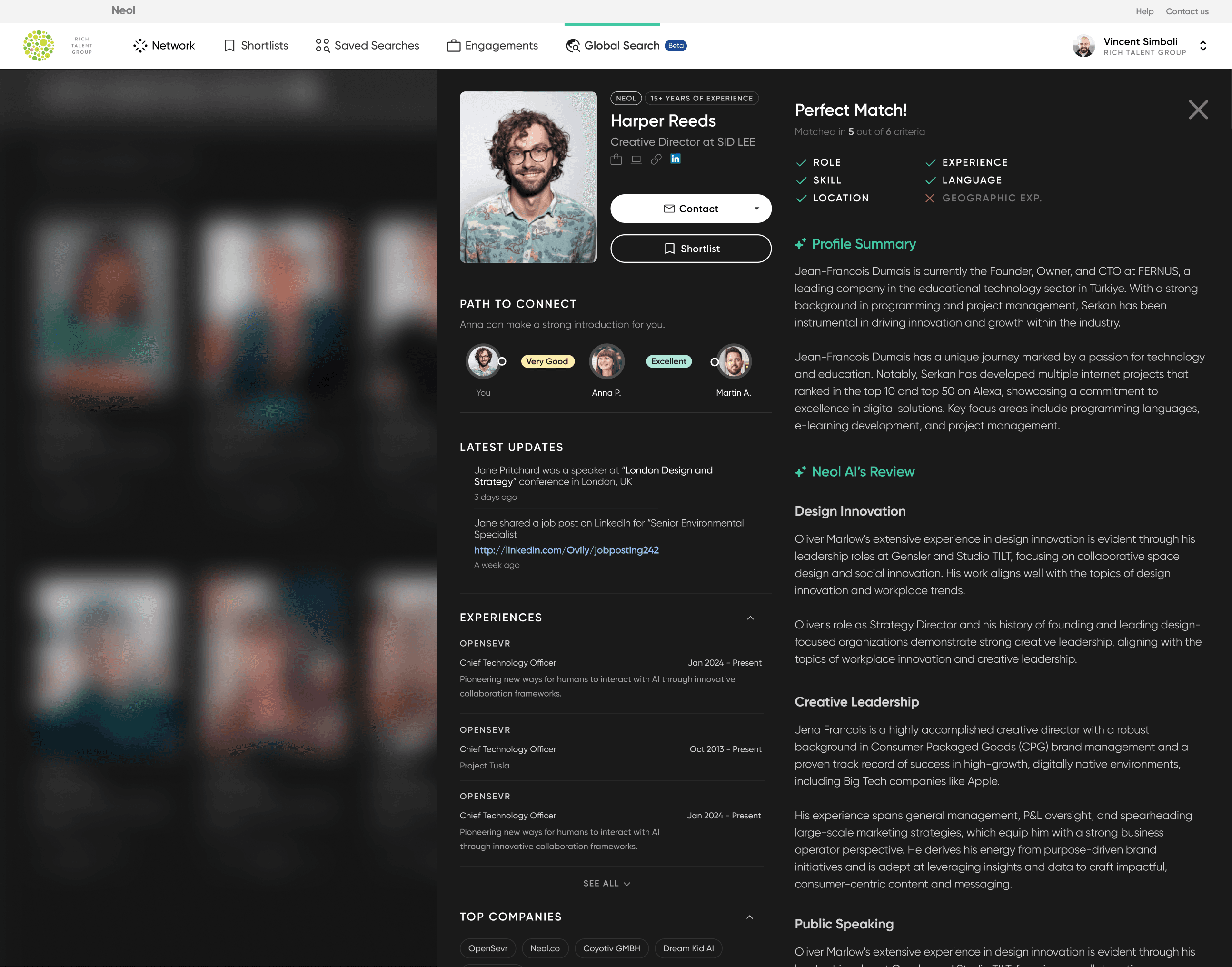
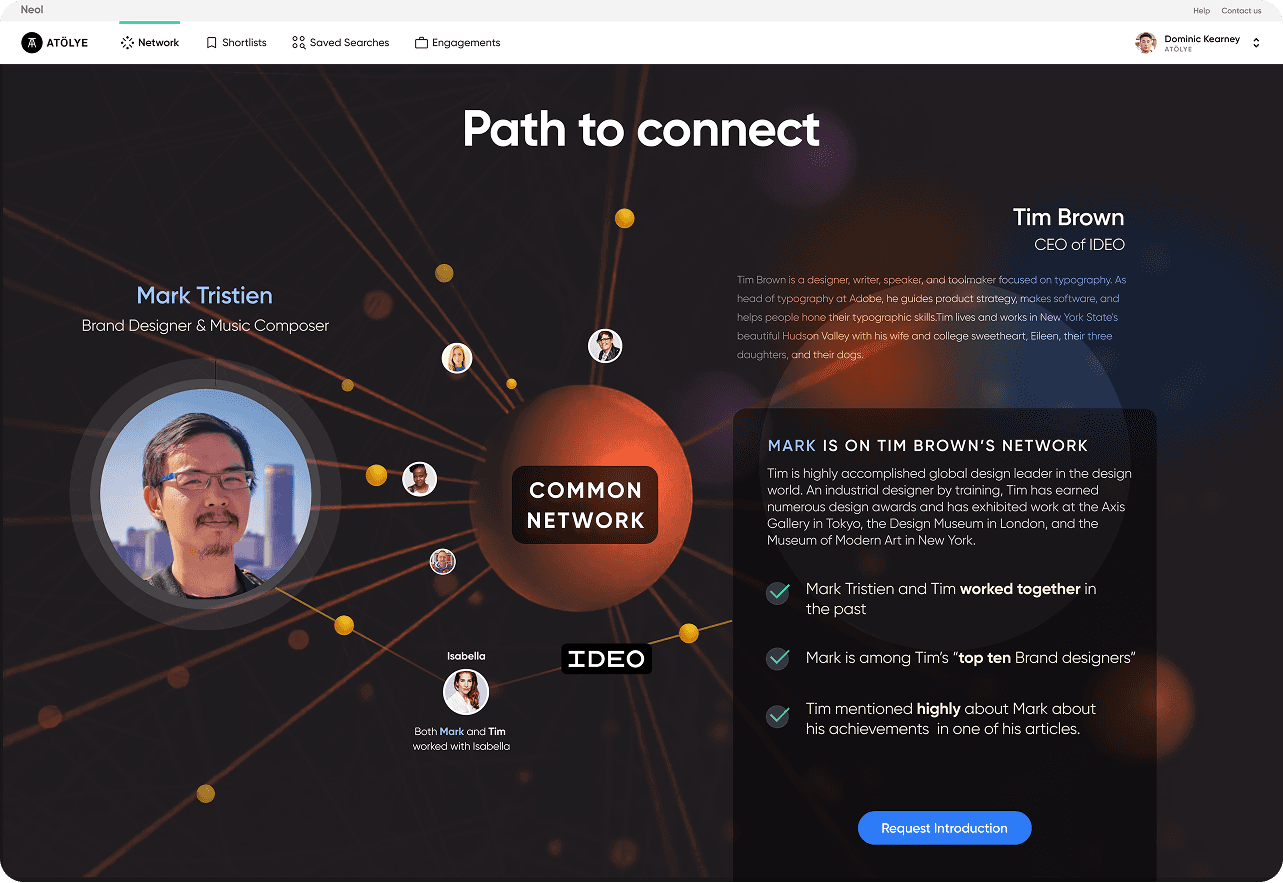
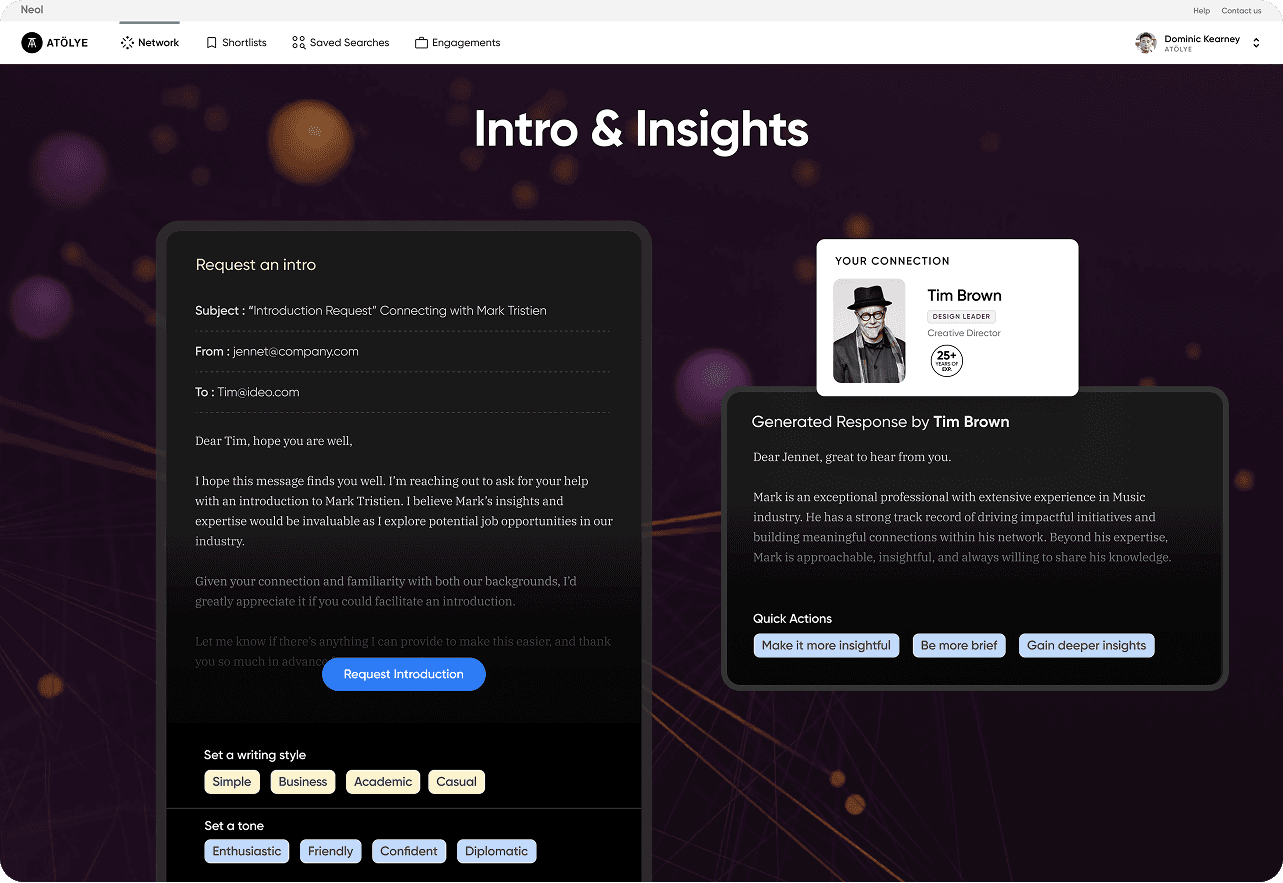
In this profile cards, recruiters can see all the necessary info about the candidate, shortlist him or contact via messaging. Path to connect shows the way how recruiter can be introduced to the candidate.
Global Search
Global Search
Global Search
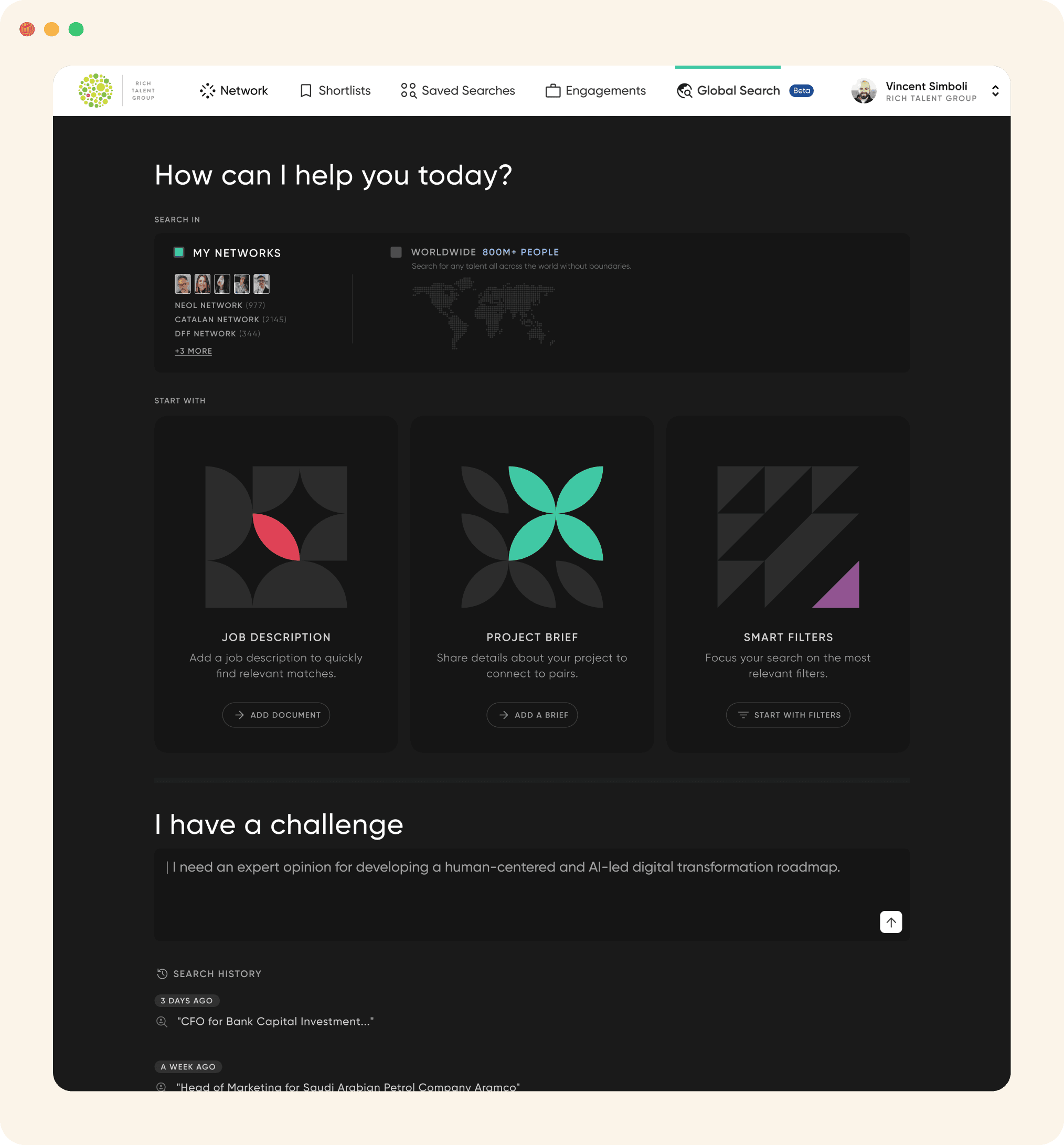
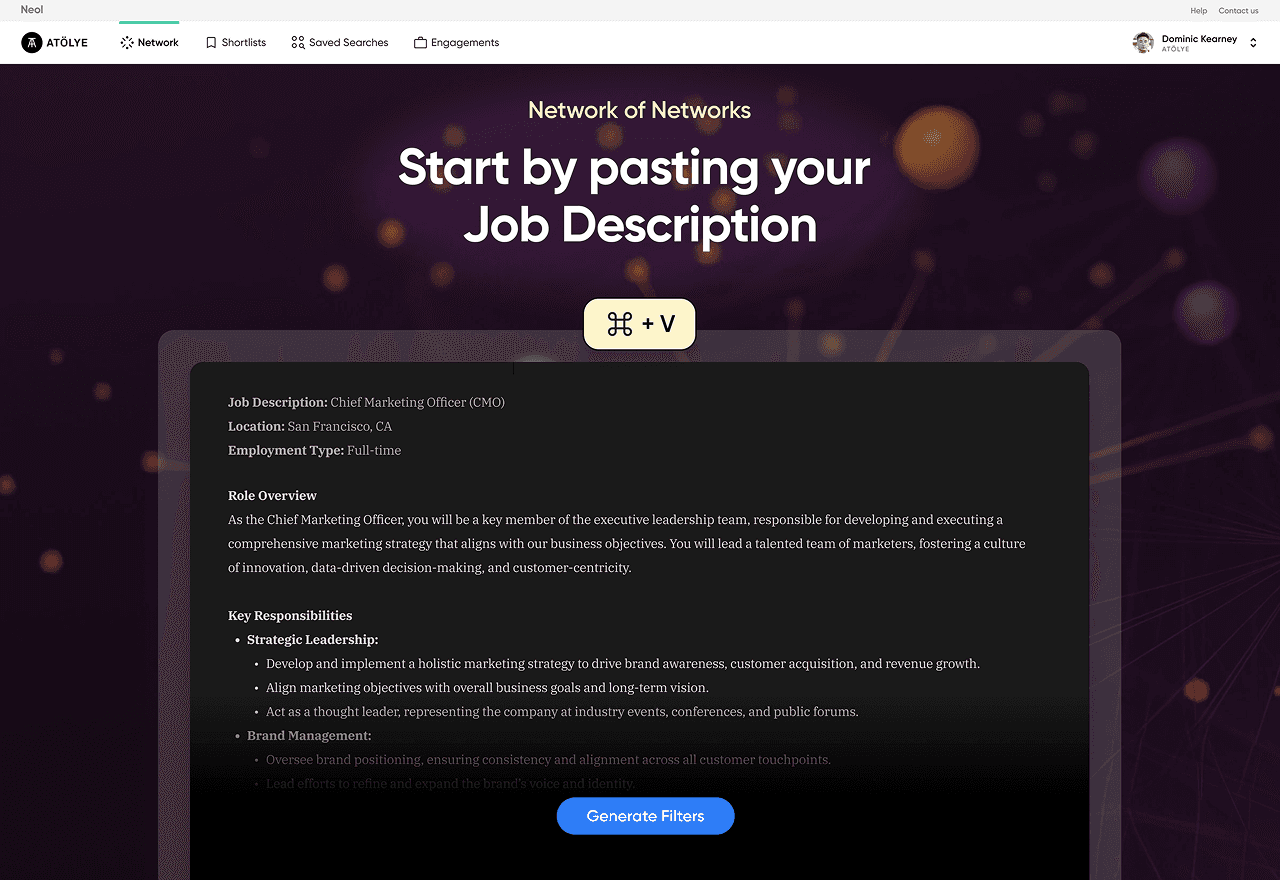
Based on our user interviews and research, recruiters use different methods to look for the ideal candidate. So I designed a starting page where recruiter can use different methods to initiate a search.
These methods are based on:
Based on our user interviews and research, recruiters use different methods to look for the ideal candidate. So I designed a starting page where recruiter can use different methods to initiate a search.
These methods are based on:
Job description
Project brief
Using smart filters
Job description
Project brief
Using smart filters
Job description
Project brief
Using smart filters
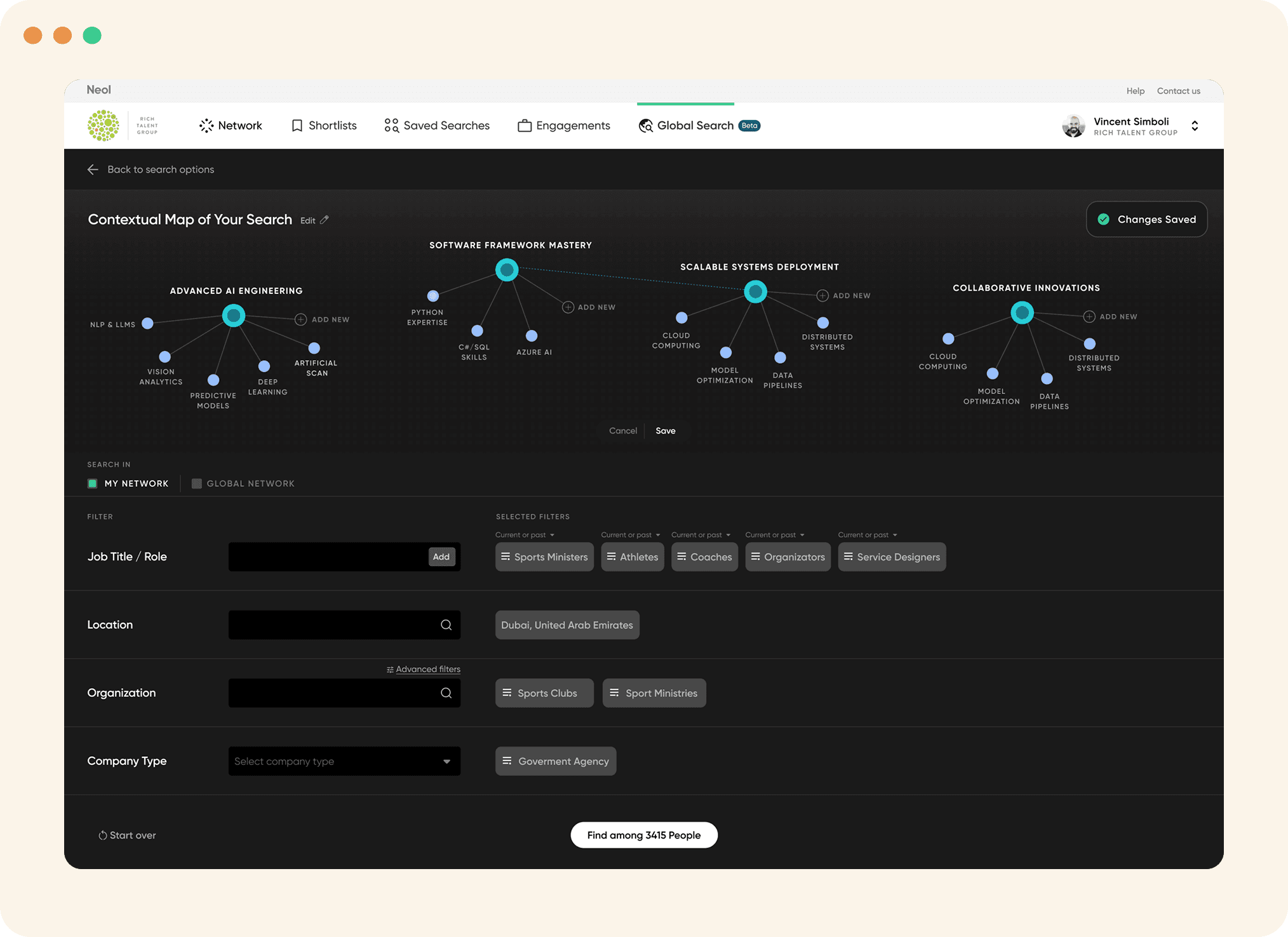
Filters and Contextual Mapping
Filters and Contextual Mapping
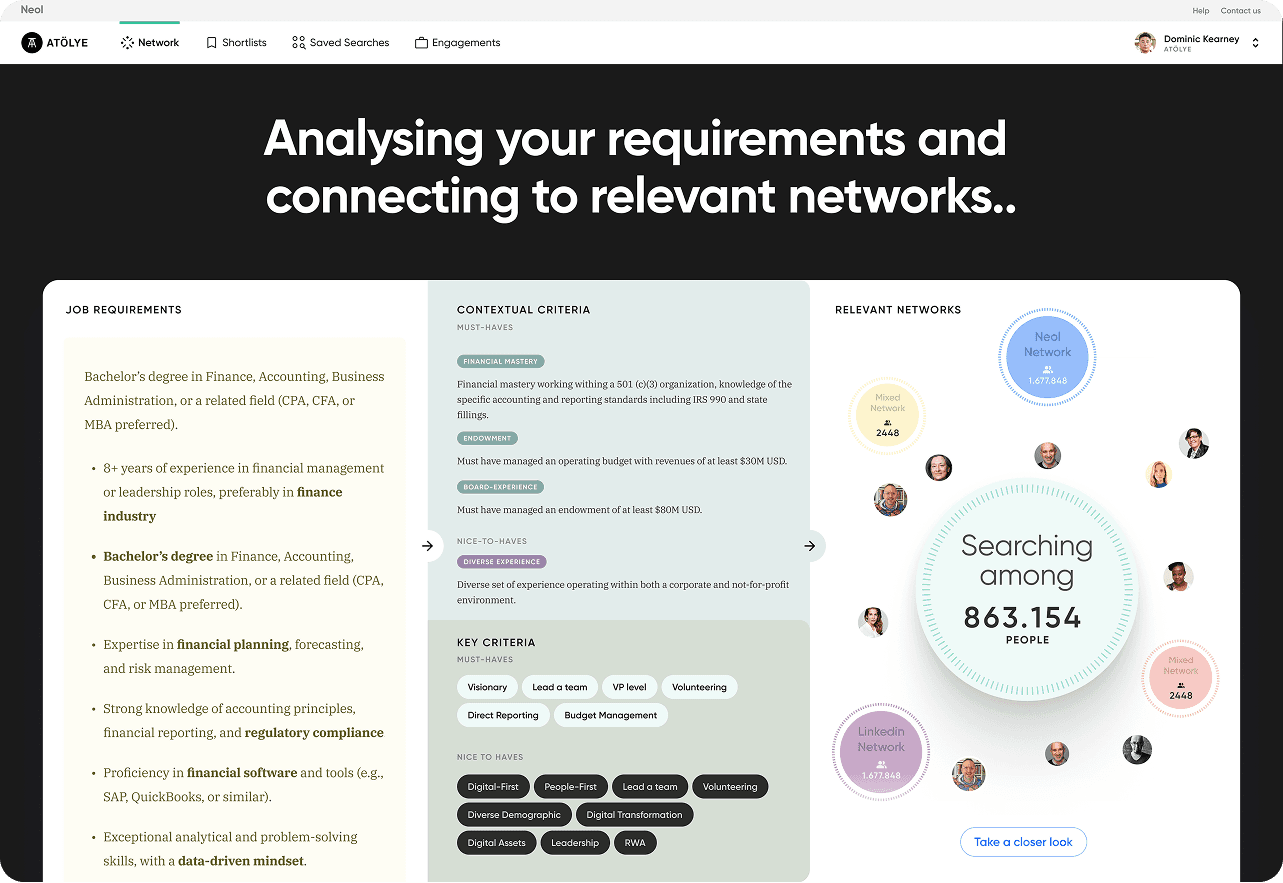
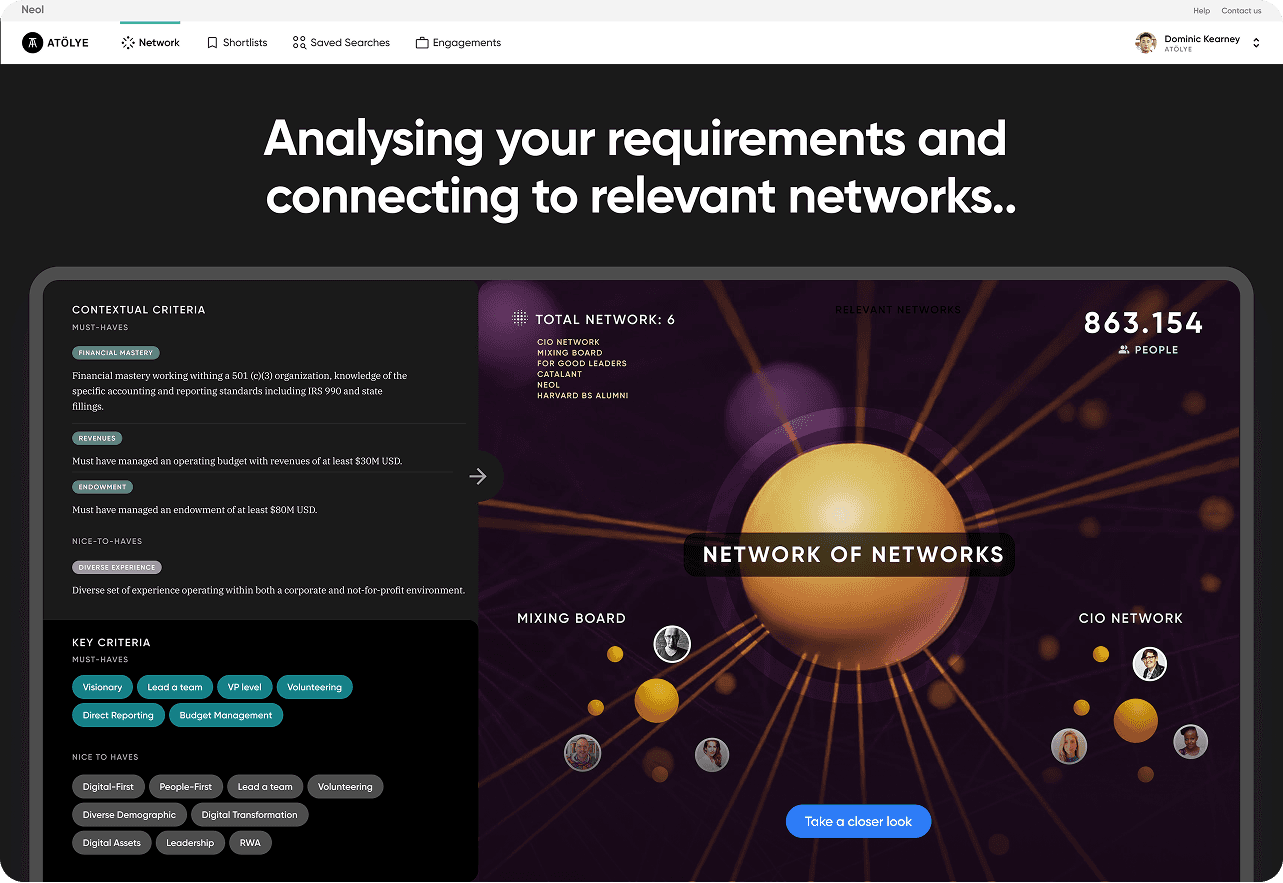
With filters, users can adjust all necessary criteria and see the contextual mapping of their search generated by AI.
It creates semantic tags and includes in the search. User can edit these semantics easily on this screen before committing the search.
With filters, users can adjust all necessary criteria and see the contextual mapping of their search generated by AI.
It creates semantic tags and includes in the search. User can edit these semantics easily on this screen before committing the search.
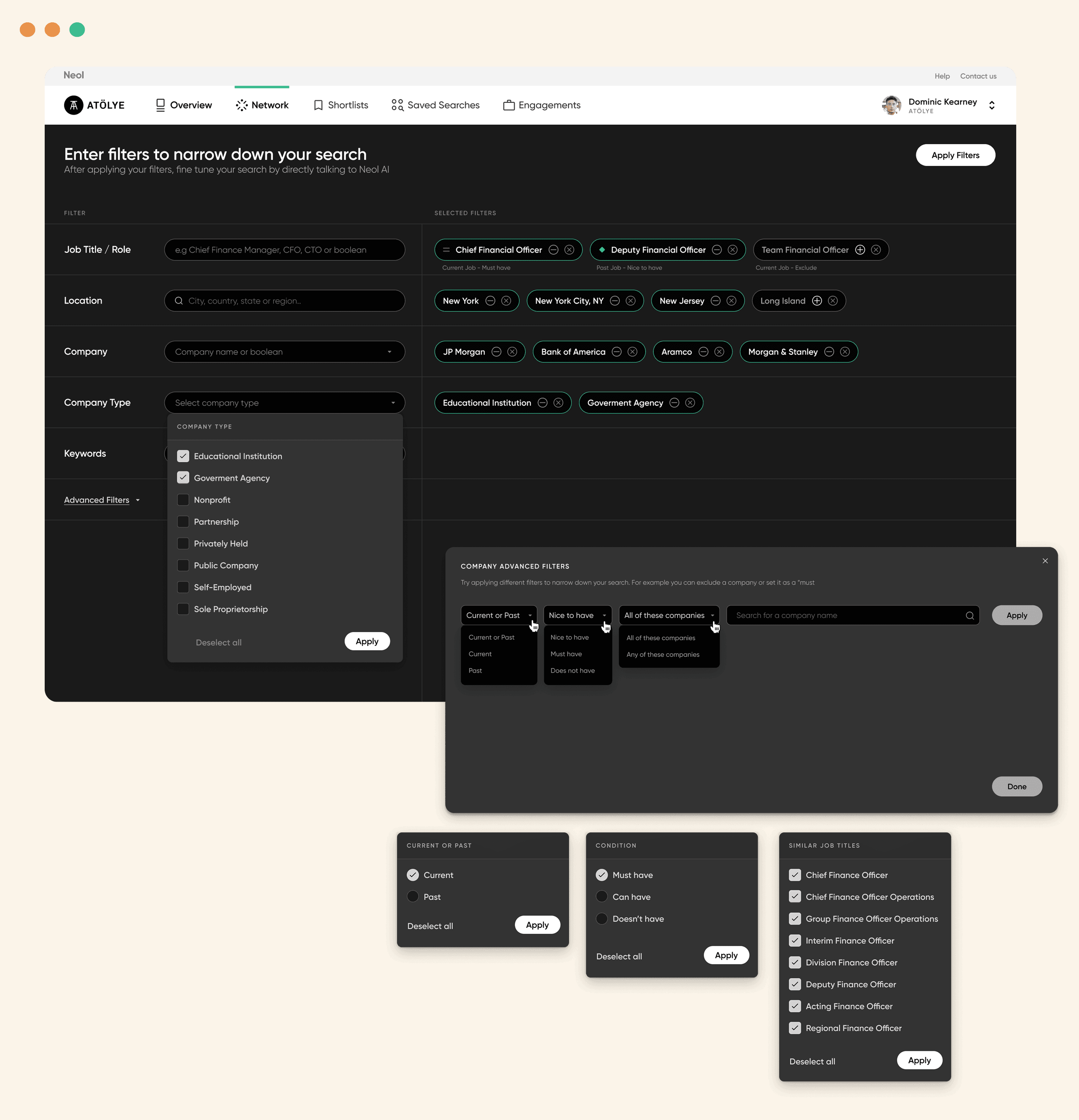
Advanced Filters
Advanced Filters
This is where advanced filters can be applied to your search. You can include or exclude specific companies, locations, semantics or roles to get a more specific results.
This is where advanced filters can be applied to your search. You can include or exclude specific companies, locations, semantics or roles to get a more specific results.
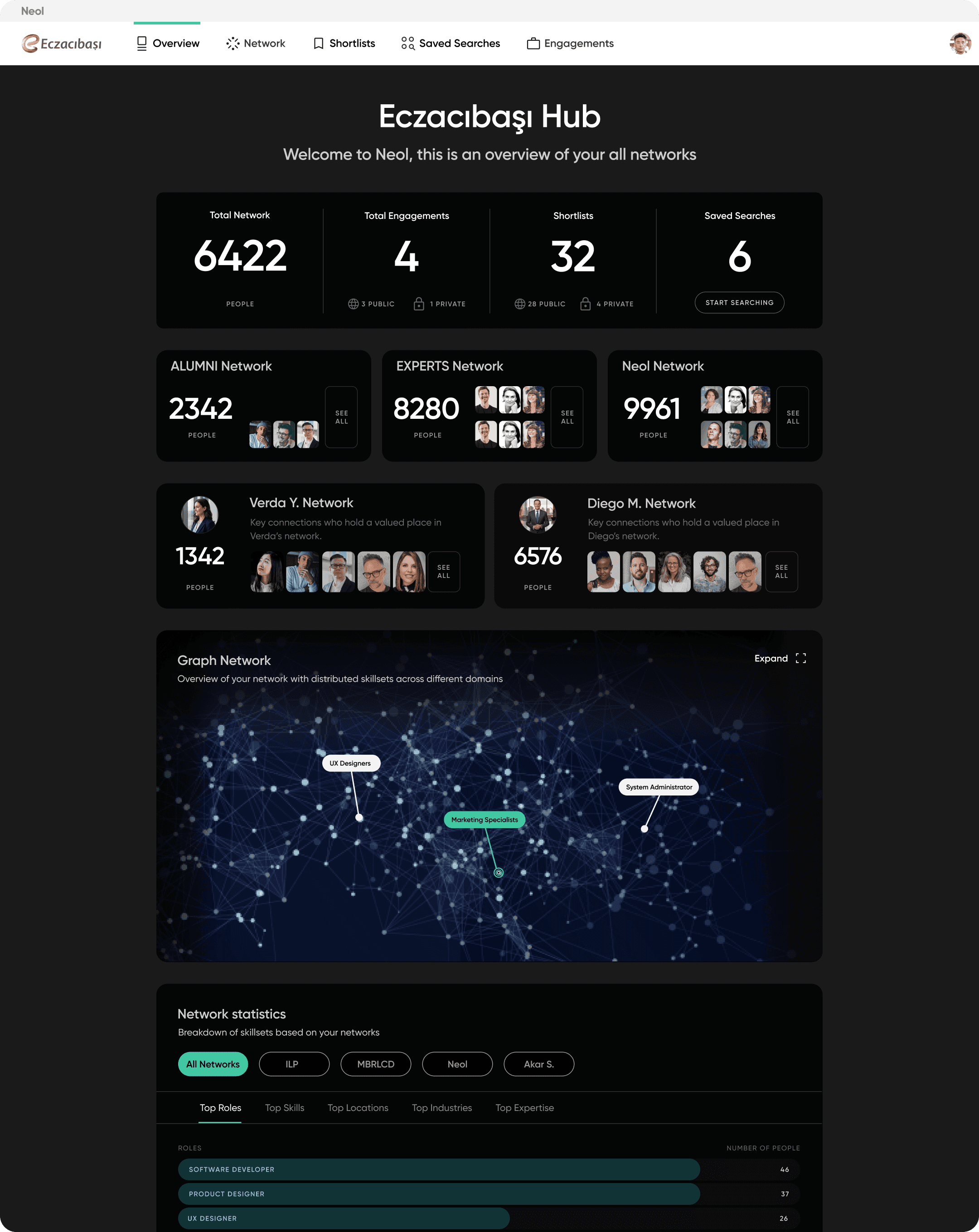
Hub Overview
Overview shows your full network capacity and features. You can see the breakdown of your networks, skill and role based stats and and latest activities on your networks.
Overview shows your full network capacity and features. You can see the breakdown of your networks, skill and role based stats and and latest activities on your networks.
Slide Deck Cards
Slide Deck Cards
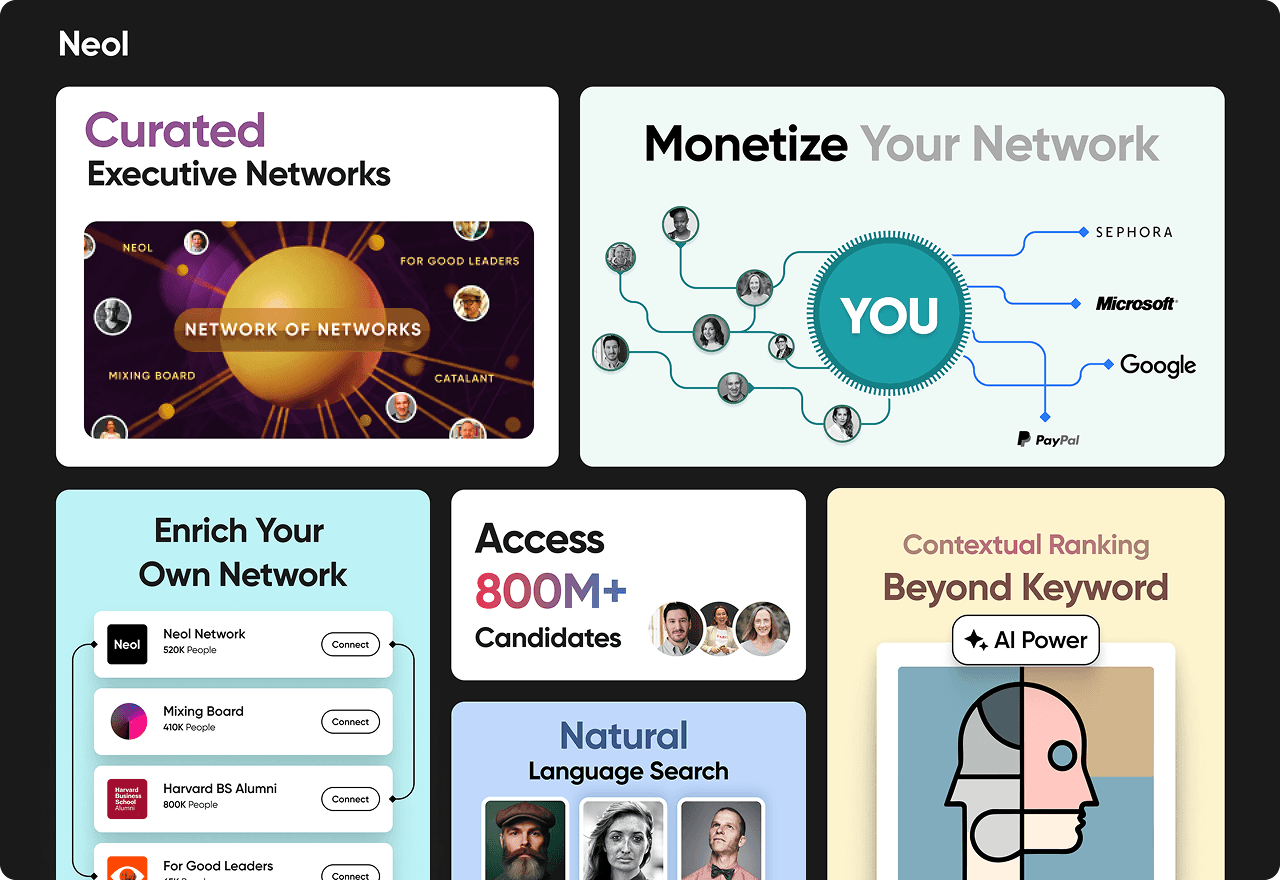
I’ve designed several slide decks for our co-founder to use in investor pitches.
They highlight the platform's value proposition, key features, and core benefits.
I’ve designed several slide decks for our co-founder to use in investor pitches.
They highlight the platform's value proposition, key features, and core benefits.
Thank you for watching
Thank you for watching